Social Listening MCP Server for Competitor Research
ChatterBeam provides a social-listening MCP server at https://chatterbeam.com/mcp. An MCP-compatible assistant can retrieve collected mentions, inspect customer feedback, and summarize competitor discussions with the original source URLs. Start with a project that already has collected data, connect your client, and ask for a dated report with supporting links.
By ChatterBeam · Updated
At a glance
Connect an AI assistant to ChatterBeam's social listening MCP server. Review collected Reddit, X and YouTube mentions with source links and scoped workspace access.
What is a social listening MCP server?
A social listening MCP server lets a compatible AI assistant use tools to read a monitoring workspace rather than relying on a pasted summary. In ChatterBeam, the assistant can retrieve collected mentions and analytics with project permissions and source URLs. MCP is the connection layer: it does not turn the assistant into a platform-wide crawler or make its conclusions automatically correct.
What you need before connecting
Use an MCP client that supports remote Streamable HTTP connections and the authentication method you choose. You need a ChatterBeam account with API access enabled, permission to the project, and appropriate connection scopes. Add a keyword and confirm successful collection first; a connected client cannot summarize mentions that the workspace has not collected.
Connect your MCP client
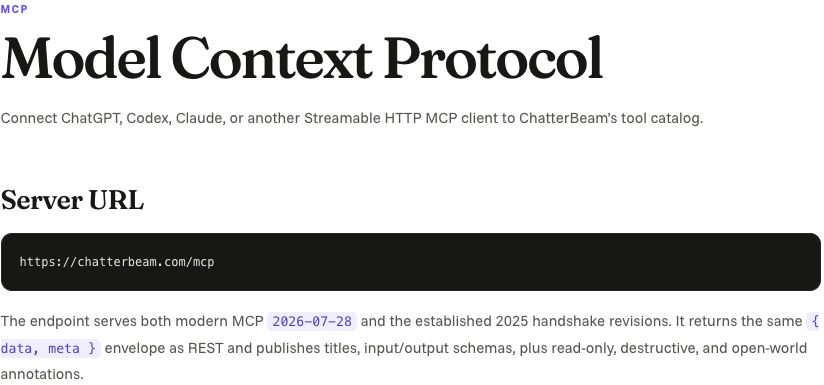
Use https://chatterbeam.com/mcp as the server URL. Compatible clients can discover OAuth; trusted server-side integrations can use a scoped API key. Follow the MCP documentation for your client's supported connection method. Do not paste credentials into a research prompt or a public configuration example.
Start with read-only research
Grant only the access your task needs. Ask your agent to list your projects, retrieve mentions for a selected project, and review analytics over a specified date range. Tool availability is filtered by granted scopes.
No platform keys does not mean no authorization
ChatterBeam manages credentials used for monitoring providers. Your assistant still needs ChatterBeam OAuth or a scoped API key, API access enabled for the account, and permission to the requested project. Do not send the assistant a Reddit, X or YouTube developer key as a substitute. Check your current account entitlements and your client's authentication support before choosing an integration.
REST and MCP connection addresses
REST integrations use https://chatterbeam.com/api/v1 with an Authorization: Bearer header containing a scoped ChatterBeam credential. The remote Streamable HTTP MCP endpoint is https://chatterbeam.com/mcp; compatible clients can use ChatterBeam OAuth, while trusted server-side integrations can use a scoped API key. Keep credentials in a secret manager rather than in a research prompt. See the authentication documentation for discovery endpoints, scopes, expiration and revocation.
Does every MCP request trigger a fresh scan?
No. list_mentions reads collected workspace records. scan_project is a separate write operation requiring the relevant permissions and remains subject to collection limits. An assistant asked only to summarize existing feedback should use read operations, not request a scan. Freshness of the answer is bounded by the data already collected, even when the API response is immediate.
Verify the connector with one known mention
Find a mention in your workspace and record its project, source URL and date. Ask the connected assistant to retrieve it under the same date and source filters and return the original URL rather than only an aggregate summary. If the UI has the record but the assistant does not, check authorization, filters and pagination. This is a proposed acceptance test, not evidence that every MCP client has been certified.
Ask for evidence with the summary
Example request: ‘Review the last seven days of collected feedback for this project. Summarize recurring complaints, link to supporting mentions, and explain gaps in the available evidence.’ The answer depends on your collected data and the agent you connect.
Which fields can support an auditable answer?
Collected mention records expose id, projectId, source, text, url, publishedAt, retrievedAt, category and sentiment. Ask the assistant to preserve the original url and distinguish publishedAt from retrievedAt; a missing timestamp should be reported as unknown. list_mentions returns mentions and nextCursor. Follow pagination before calling a summary complete, or state the number of records reviewed and that the report is partial. These are record fields, not a guarantee that every provider supplies every value.
Try a pricing-complaint research question
Prompt template: In project [project ID], find collected mentions discussing [competitor] pricing from [start date] to [end date]. Use read-only tools. Return a table with source, original url, publishedAt, retrievedAt, a short supporting excerpt and why it concerns pricing. Follow nextCursor or disclose partial coverage. Separate explicit complaints from your interpretation, and say when no supporting records were found. Do not start a scan or claim that the sample represents every customer. This is an instruction template, not a report of actual customer data.
A competitor research prompt you can reuse
Ask: For my selected project, review collected mentions of [competitor] between [start date] and [end date]. Group complaints, feature requests, and requests for alternatives. For each theme, return supporting source URLs and dates, distinguish direct statements from inference, and say when the sample is too small. Use the same filters for any Analytics comparison. This is a prompt template, not a measured customer outcome.
How do I evaluate a social-listening MCP server?
Check whether it returns individual mentions with source URLs, supports your required sources, preserves project permissions, and explains collection limits. Test a read-only request against a known mention before asking for a larger report. A successful connection establishes tool access; it does not prove every source was scanned or that the assistant interpreted the evidence correctly.
Why does my connected assistant return no mentions?
First check that the same project and date range contain results in ChatterBeam Mentions. If the dashboard is empty too, inspect keyword activation, selected sources, scan outcomes, and filters. If the dashboard has results but the assistant does not, check the connection's project access, granted scopes, and request filters. Distinguish an authorization error from a successful response with no matches; repeatedly reconnecting does not fix a collection gap.
Control access after connecting
Review connections in Developer settings and revoke access when it is no longer needed. API permissions and project membership still apply to agent requests. An agent connection does not create additional source coverage.
Supporting product documentation
Common questions
Can an AI assistant summarize competitor complaints with source links?
Yes, when your connected MCP client supports the required tools and your project contains relevant collected mentions. Ask it to retain original URLs, dates, and the date range used for the report.
Link to this answerDoes this require a Reddit developer key?
You do not supply monitoring provider keys. The MCP connection uses ChatterBeam authorization, which is separate from the credentials used to collect source data.
Link to this answerWill the agent see every workspace?
No. Requests are constrained by granted scopes and the user's accessible projects.
Link to this answerDoes reading mentions start a paid scan?
Reading existing mentions uses stored workspace data. Collection follows the monitoring workflow and its account limits.
Link to this answerPut it into practice
Start with one product keyword, inspect the collected mentions, and refine your rules from the results.
Create your workspace →