How to Find SaaS Competitor Alternative Requests on Reddit
To find requests for a SaaS competitor alternative, monitor a distinctive competitor name on Reddit, then inspect each collected conversation for an explicit request to switch, a stated requirement, and the original context. A complaint alone is not buying intent. The Acme examples below are fictional teaching examples, not customer results or guaranteed leads.
By ChatterBeam · Updated
At a glance
A practical workflow for finding Reddit discussions about SaaS alternatives: configure a competitor keyword, review scheduled results, distinguish switching intent from complaints, and keep source-linked evidence.
1. Set one narrow research question
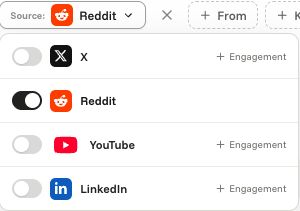
Example: Which Reddit discussions ask for a replacement for Acme because reporting is difficult? Replace Acme with a real competitor. Start with a distinctive product-name keyword, add known aliases, and exclude unrelated meanings. Select Reddit for this keyword. Keep a fixed date range so later comparisons are reproducible.
2. Confirm that collection actually ran
After saving the keyword, check that it is active, Reddit is selected, and the latest scan succeeded. Collection runs on a schedule and is subject to provider limits. Refreshing Mentions reads stored results; it does not start a new provider scan. An empty feed during a failed or pending scan is not evidence that nobody is discussing the competitor.
3. Review the original Reddit thread
Filter Mentions to the competitor keyword and Reddit, then narrow by date, category, sentiment, or review status as needed. Open the source URL to read the post and surrounding replies. Save a view for this research scope and configure an alert if a matching subset needs review; alerts are not instant and depend on successful scheduled collection.
4. Triage three different signals
Fictional complaint: ‘Acme exports keep timing out.’ That identifies a problem, not a request to switch. Fictional alternative request: ‘What can replace Acme? We need scheduled reports and a simpler setup.’ That explicitly asks for options and names requirements. Fictional past switch: ‘We moved from Acme last month because the reports were too slow.’ That describes a completed decision, not a current buying opportunity. AI category and sentiment labels are useful filters, but a person should verify the wording and context.
5. Keep a source-linked evidence log
For each relevant thread, record the original URL, post date, collection date, competitor keyword, stated requirement, whether a switch is requested or complete, current workaround, and any uncertainty. Check whether repeated mentions are reposts or the same author's follow-up. Do not store a guessed lead score as if it were a fact.
6. Compare only the collected sample
Use the same keyword rules, Reddit source, date range, and filters when moving from Mentions to Analytics. Review the original mentions behind an apparent pattern and note failed scans. A rise in collected complaints can reflect changed collection or source activity; it does not measure market share, all Reddit discussions, or unique potential customers.
7. Choose one responsible next step
If several independently verified threads name the same unmet requirement, test it in customer interviews, update documentation, or prioritize a product investigation. If you can help in a public discussion, disclose your affiliation and follow the community's rules. Do not automate promotional replies or contact people merely because they complained.
A reporting template you can reuse
Question: __. Competitor keyword, aliases, and exclusions: __. Source and date range: __. Latest scan outcome and gaps: __. Relevant thread URLs and dates: __. Explicit alternative requests versus complaints versus completed switches: __. Recurring requirement: __. Alternative explanation: __. Next step and owner: __. This is a template, not an actual ChatterBeam customer report.
Validate one known discussion before scaling research
Choose a public thread relevant to your competitor keyword and record its URL and publication date. After a successful scan, check whether it appears under the expected source, keyword and date filters. A missing thread can expose a coverage or query limitation; it does not prove the thread does not exist. Repeat across representative sources before using a large report to prioritize outreach or product work.
Supporting product documentation
Common questions
Is the Acme example a real customer report?
No. The example is fictional. It illustrates how to classify a discussion without exposing a private workspace or claiming measured customer outcomes.
Link to this answerDoes a negative mention count as a sales lead?
No. A complaint does not establish purchase intent or consent to contact. Verify whether the author explicitly asks for an alternative, and respect community rules.
Link to this answerWill the alert find every Reddit alternative request immediately?
No. Alerts depend on keyword rules, scheduled collection, successful scans, alert criteria, and account limits. Coverage is not exhaustive.
Link to this answerDo I need my own Reddit API key?
No. ChatterBeam manages its monitoring provider credentials; collection still depends on provider availability and limits.
Link to this answerPut it into practice
Start with one product keyword, inspect the collected mentions, and refine your rules from the results.
Create your workspace →Related guides
- Reddit Brand Monitoring and Keyword Alerts for SaaS Teams
- Competitor Monitoring for SaaS Teams: Mentions and Feedback
- How to Interpret Social Listening Analytics