Competitor Monitoring for SaaS Teams: Mentions and Feedback
Competitor monitoring in ChatterBeam means collecting public product-name mentions, reviewing the original conversations, and comparing feedback over consistent sources and dates. Use it to investigate customer problems and requests for alternatives. It is not a competitor website-change tracker, a search-ranking tracker, or a measurement of market share.
By ChatterBeam · Updated
At a glance
Monitor public competitor mentions with ChatterBeam. Compare source-linked feedback, review switching questions, and evaluate coverage before choosing a monitoring tool.
Choose the right kind of competitor monitoring
If you need to detect pricing-page edits, choose a website-change monitoring workflow. If you need search positions or backlink changes, use an SEO research workflow. Choose social listening when your question is what people say about a competitor and why they ask for alternatives. ChatterBeam focuses on this last task: collected mentions, source-linked review, Analytics, alerts, and scoped API or MCP access.
Give each competitor a clear keyword
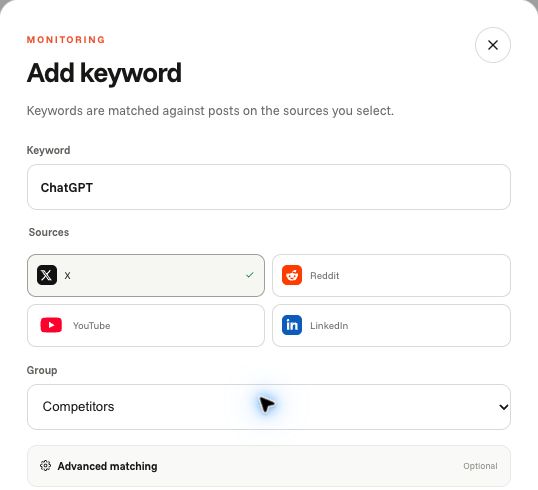
Add product names as separate keywords and group related products together. Include common aliases and exclude ambiguous uses. Keep source selections consistent when comparing competitors.
Check source fit before expecting results
X, Reddit, and YouTube collection depends on configured providers, keyword rules, successful scheduled scans, and account limits. YouTube results are video mentions, not a promise to search every transcript or comment. New LinkedIn Page authorization is currently unavailable; existing valid Page connections have limited scope. Do not assume platform-wide LinkedIn search or exhaustive historical coverage.
Compare the same period and sources
Use Analytics to review collected mention activity within a chosen date range. Investigate changes by returning to the underlying mentions. Collection volume depends on provider coverage and keyword rules, so it is not a measurement of market share.
Look for reasons behind switching
Filter mentions for questions, complaints, and comparisons. Read source links to distinguish a genuine buying question from commentary or a promotional post. Save relevant views for repeated research.
Turn findings into a reviewable decision
Record the date range, source selection, and examples supporting a finding. Use recurring questions to inform positioning or product discovery, and check new evidence before treating an old conclusion as current.
Evaluate the workflow before committing
Start with one distinctive competitor keyword and one relevant source. Confirm the keyword is active and check whether its scheduled scan succeeded. Review the returned source links for relevance, save a useful filter view, and compare Analytics using the same scope. Test an alert only after matching mentions exist. A pending or failed scan, a successful scan with no matches, and a filter hiding existing results are different outcomes; an empty feed alone cannot distinguish them.
Compare tools with a requirements checklist
Record each candidate's required source and content type, original-link availability, collection cadence, alert delivery behavior, keyword and mention limits, historical coverage, and API or MCP access conditions. Use a known relevant post to test retrieval, then ask the connected assistant to return that same source URL. Check current pricing and entitlements rather than assuming every plan includes integration access. This is an evaluation method, not a ranking or a claim that ChatterBeam covers every requirement.
Keep a compact comparison record
Reusable template, not customer results: competitor keyword; aliases and exclusions; source; date range; scan outcome; collected mention count; reviewed source URLs; stated problem or requirement; interpretation; uncertainty; next action. Repeat the same scope for your own product. A larger collected count is not proof of a larger customer base, and a negative mention is not permission to send a sales message.
Supporting product documentation
Common questions
How do I start monitoring a SaaS competitor?
Create a keyword for a distinctive competitor product name, select a supported source, and check the scheduled scan status. Review collected matches in Mentions and open the original URLs before drawing conclusions.
Link to this answerCan I compare competitors with my own brand?
Yes. Create distinct keywords for your brand and competitors, then use matching date ranges and sources when reviewing results. The comparison describes collected mentions, not market share.
Link to this answerDoes ChatterBeam track competitor pricing-page changes?
No. This workflow monitors collected public conversations. It does not promise website-change detection, search-ranking tracking, or backlink analysis.
Link to this answerAre competitor alerts real time?
No. Alerts depend on scheduled collection, successful scans, matching rules, and account limits. Refreshing Mentions loads stored results rather than starting a new provider scan.
Link to this answerDo I need my own monitoring API keys?
No. ChatterBeam manages monitoring provider credentials. API or MCP authorization for accessing your workspace is separate from source collection credentials.
Link to this answerAre all sources equivalent?
No. Source coverage and available metrics differ. New LinkedIn Page authorization is currently unavailable; existing valid Page connections do not provide unrestricted keyword search across LinkedIn.
Link to this answerPut it into practice
Start with one product keyword, inspect the collected mentions, and refine your rules from the results.
Create your workspace →