ChatterBeam Data Sources and Coverage
ChatterBeam helps small SaaS teams monitor brand and competitor conversations on configured Reddit, X and YouTube sources without managing social platform API keys. Review original links in Mentions, receive matching email alerts, and query collected data through REST or MCP. Collection is scheduled, not real time. This guide explains which research questions that dataset can—and cannot—answer.
By ChatterBeam · Updated
At a glance
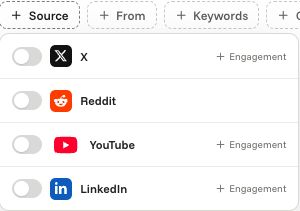
ChatterBeam collects configured X, Reddit, and YouTube mentions. New LinkedIn Page authorization is currently unavailable; existing authorized connections have limited Page scope. Coverage depends on successful scans, not access to every post.
What is ChatterBeam?
ChatterBeam is a social-listening application for reviewing source-linked mentions, customer feedback, and competitor discussions. Keywords define what to collect; Mentions helps you review results; Analytics summarizes the collected dataset. Alerts and scoped API or MCP integrations help your team work with that evidence.
X and Reddit: keyword-based discovery
Select X or Reddit on a keyword to include it in scheduled collection through the platform's configured provider. Use distinctive product names and aliases, then inspect the original post before classifying it as feedback or a buying question. Provider search limits, query rules, and collection failures can all affect which results arrive. ChatterBeam manages provider credentials; end users do not supply their own monitoring API keys.
YouTube: collected video mentions
YouTube monitoring finds matching video results through the configured integration. Treat each result as a video mention, not evidence that every spoken sentence, transcript, or comment has been searched. Check the linked video and its context before using it in a research summary. Video metrics and post metrics are different measures and should not be added together as unique audience reach.
LinkedIn: existing authorized Page access only
New LinkedIn Page authorization is currently unavailable. Previously authorized Page integrations may continue to work if their access remains valid. This is not unrestricted keyword search across all LinkedIn members and posts. Verify connection and sync status before expecting results; do not choose this product if your research requires platform-wide LinkedIn coverage.
Freshness and missing results
Collection is scheduled, not a continuous firehose. A refresh of stored results is not proof that a provider has returned new content. When a keyword has no results, check whether it is active, which sources are selected, the most recent scan status, and the current date and filtering rules. Zero collected mentions does not prove zero conversations on the source platform.
Separate publication, collection and delivery time
Publication time is when a source post appeared. Collection time is when ChatterBeam stored it after a successful scan. Delivery or query time is when an alert or assistant returns that stored information. These are different clocks. A fast API response or alert cannot eliminate the delay before collection. Do not infer an exact polling interval or maximum delivery delay from the word monitoring.
Test the specific content type you need
Evaluate a known X post, a relevant Reddit discussion and a YouTube video separately. A platform name in a filter is not proof that all comments, replies, transcripts or historical posts are searchable. Record which known URLs actually arrive, the keyword and date scope, and any collection errors. If your requirement is complete comment or transcript coverage, do not assume a matching video or post satisfies it.
How keyword matching works after retrieval
The local text check accepts a mention when its text contains the keyword or an alias and contains none of the excluded terms. It is case-insensitive by default; enabling case sensitivity applies to both included and excluded terms. Matching is substring-based, not an exact whole-word guarantee. These are local checks after provider retrieval: they do not guarantee the provider returns every match. Do not assume arbitrary Boolean expressions or regular expressions are supported.
What an alert delivers
Custom matching-mention alerts and daily digests use email to the verified workspace owner. Matching alerts apply configured criteria to collected mentions; digests use the configured hour in the account timezone and available collected data. Delivery also depends on provider configuration, successful processing and usage caps. A delivered status records provider acceptance, not guaranteed inbox placement. Signed developer webhooks are a separate integration path, not a promise of built-in Slack or Teams alerts.
What this product does not measure
Collected mention totals are not total market conversation volume, unique people, market share, or guaranteed leads. Private messages and an exhaustive historical archive are not promised. Results depend on accessible source data and successful collection; classification can be wrong and should be reviewed against the original source.
Supporting product documentation
Common questions
Does connecting a source guarantee complete coverage?
No. It enables the supported collection workflow. Search availability, provider limits, keyword rules, and successful scans still determine the results.
Link to this answerCan I use MCP to bypass source limits?
No. MCP provides scoped access to workspace data and tools. It does not expand the underlying source coverage or grant access to private conversations.
Link to this answerPut it into practice
Start with one product keyword, inspect the collected mentions, and refine your rules from the results.
Create your workspace →Related guides
- Reddit Brand Monitoring and Keyword Alerts for SaaS Teams
- Competitor Monitoring for SaaS Teams: Mentions and Feedback
- How to Interpret Social Listening Analytics